Asset
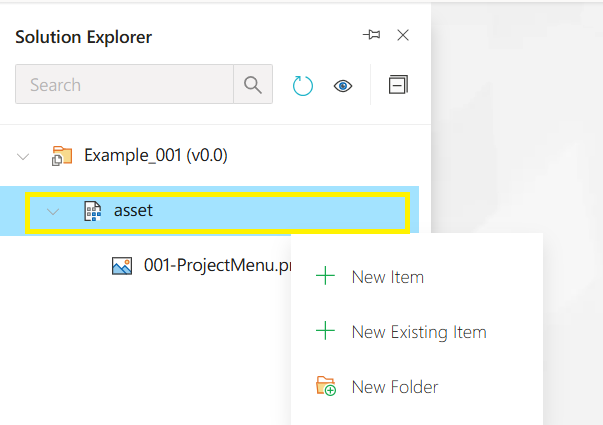
The asset folder stores project-related resource files (such as images, scripts, etc.). New files or folders can be added via the right-click context menu. The asset folder is a dedicated directory in the Synergy IDE where project-related media, JSON files, JavaScript scripts, and other auxiliary files are stored. The following operations are commonly performed within this folder:
Context Menu Options:
-
New Item
Used to create a new file within the project. For example:- You can create new files such as
.ts,.css,.json,.tsx,.html, etc. - The newly created file will appear under the asset folder.
- You can create new files such as
-
New Existing Item
Used to include an existing file from your local machine into the asset folder.- For example: images, pre-configured JSON files, or external script files can be added.
- A file selection dialog will open and the selected file will be imported into the project.
-
New Folder
Creates a subfolder inside the asset directory.- Helps organize assets into categories (e.g.,
images,scripts,templates).
- Helps organize assets into categories (e.g.,
Usage Scenarios:
- Uploading a logo to be used in a form using the New Existing Item option.
- Creating script files to be triggered via button actions.
- Defining configuration structures using
.jsonfiles.
Asset Modals
The asset folder stores project-related resource files (such as images, scripts, etc.). New files or folders can be added via the right-click context menu.